Blender插件-重拓扑收缩贴合工具 Polymating V1.1.2

Blender插件-重拓扑收缩贴合工具 Polymating V1.1.2

可与 Blender 现有工具配合使用的 Retopology 插件。插件的核心是类似于 Shrinkwrap 修改器的空间分区系统,想象一下,如果可以在与 Blender 专有工具集成的同时在后台反复重新应用 Shrinkwrap。


A Retopology addon that works with Blender existing tool. At the core of the addons is a spatial partitioning system similar to Shrinkwrap modifier, imagine if Shrinkwrap can be reapply over and over again in the background while integrating with Blender proprietary tools.

支持软件版本 Blender 4.3, 4.2, 4.1, 4.0, 3.6


【下载地址】

城通网盘 访问密码:6688           百度网盘 提取码: dsvy           阿里云盘


Blender插件-手绘几何图形三维建模工具 Sketchn’carve v4.3.0a

Blender插件-手绘几何图形三维建模工具 Sketchn’carve v4.3.0a

一款艺术家友好的建模工具,旨在利用Blender的Grease Pencil工具简化和加快3D建模。它使用户能够通过单击绘制任何图形并将其转换。它是一种建模的替代方法,为用户提供了极大的艺术自由和速度,并且无需触碰任何顶点即可进行建模。


Sketch N’ Carve is an artist friendly modeling tool designed to simplify and speed up 3D modeling by taking advantage of Blender’s Grease Pencil tools. It enables the user to sketch and convert any drawing to 3D geometry with a single click. It is an alternative way to modeling that gives the user tremendous artistic freedom and speed and the ability to model without ever having to touch a single vertex.


支持软件版本 Blender 4.3, 4.2, 4.1, 4.0, 3.6, 3.5, 3.4, 3.3, 3.2, 3.1, 3.0, 2.9


【下载地址】

城通网盘 访问密码:6688           百度网盘 提取码: 77tc          阿里云盘


Blender插件-高效且功能齐全的UV贴图打包工具 UVPackmaster PRO v3.3.4

Blender插件-高效且功能齐全的UV贴图打包工具 UVPackmaster PRO v3.3.4

UVPackmaster 2是一种高效且功能齐全的UV贴图打包工具,可作为命令行工具使用。就在CPU上打包而言,它可能是最高效的UV打包程序,但它也提供了该算法的Cuda加速变体。在GPU上运行时,它的性能明显优于所有其他打包程序。请注意,UVPackmaster不仅意味着高性能,而且还提供了许多复杂的功能,大大简化了您的UV包装工作流程。


UVPackmaster 2 is an efficient and fully-featured UV packing engine available as a command line tool. It is probably the most efficient UV packer out there in terms of packing on CPU but it also provides a Cuda accelerated variant of the algorithm. When running on a GPU it significantly outperforms all other packers available.


支持软件版本 Blender 4.3, 4.2, 4.1, 4.0, 3.6, 3.5, 3.4, 3.3, 3.2, 3.1, 3.0, 2.9, 2.8


【下载地址】

城通网盘 访问密码:6688            百度网盘 提取码: c2yg            阿里云盘


Blender插件-真实逼真色彩渲染工具 Render Raw V1.1.3

Blender插件-真实逼真色彩渲染工具 Render Raw V1.1.3

插件提供了一个简单但功能强大的界面,用于完善 Blender 中的色彩。Blender 中的高级颜色工作流程远非简单直观,这导致一些艺术家对他们的结果不满意。请继续阅读以了解为什么会出现这种情况,以及 Render Raw 如何为您节省数小时的工作时间,并让您只需单击几下即可获得更好的渲染效果。


Render Raw provides a simple yet powerful interface for perfecting colors in Blender. The advanced color workflow in Blender is far from straightforward or intuitive, which leaves some artists unsatisfied with their results. Read on to discover why this is the case and how Render Raw will save you hours of work and can get you better-looking renders with just a few clicks.


支持软件版本 Blender 4.3, 4.2, 4.1


【下载地址】

城通网盘 访问密码:6688          百度网盘 提取码: jk88           阿里云盘


Blender插件-一键批量生成材质纹理工具 BAM V1.1.1

Blender插件-一键批量生成材质纹理工具 BAM V1.1.1

这款Blender插件旨在简化和加速材质的批量创建和管理。主要功能:

  • 批量材质创建和更新:从纹理文件夹中直接创建或更新材质,支持子文件夹、自定义后缀、色彩空间、预设以及 OpenGL/DirectX 法线贴图等。
  • 材质管理器:提供一个易于使用的界面,用于创建、删除、替换、分配、选择和分析材质。
  • 优化选项:包括批量清理未使用的材质槽和材质,以及修复重复的材质并重新分配到对象。
  • 自定义预设:允许用户通过选择每个纹理的颜色通道来定制打包的纹理贴图,例如 ARM(Ambient、Roughness、Metallic)


支持Blender软件版本 4.2, 4.1, 4.0, 3.6


【下载地址】

城通网盘 访问密码:6688            百度网盘 提取码: r8hh             阿里云盘


Blender插件-随机网格形状细节生成器 Random Flow v3.4.0+预设库

Blender插件-随机网格形状细节生成器 Random Flow v3.4.0+预设库

Random Flow是一种随机网格生成器,专为快速简便的硬表面原型设计和概念艺术而设计。Random Flow is a random mesh generator designed for fast and easy hard surface prototyping and concept art.


插件特征:

  • 随机挤压– 从循环对象中生成随机挤压以创建有趣的形状和细节。
  • 随机面板- 创建高度也可以随机化的面板细节或挤压。
  • Random Scatter – 在网格中的表面点上随机散布对象或集合对象。
  • 随机管- 在网格的选定面上生成随机管。


支持Blender软件版本 4.3, 4.2, 4.1, 4.0, 3.6


【下载地址】

城通网盘 访问密码:6688          百度网盘 提取码: 7qen           阿里云盘


Blender插件-图层动画控制 Animation Layers V2.1.9.4

Blender插件-图层动画控制 Animation Layers V2.1.9.4

使用标准动画层 UI 和工作流直接在您的 3D 视口中使用额外的层功能快速编辑您的动画或动作捕捉数据。Animation Layers是一个插件,可将 NLA 编辑器的工作简化为标准动画层工作流程。您可以快速创建、选择和编辑每个图层,而无需进入 NLA 的调整模式,并且在处理任何图层时始终可以看到最终结果。快速添加或删除图层,或使用 NLA 的“静音、影响、独奏及其混合模式”选项控制其影响。当您对动画感到满意时,您可以随时合并图层或烘焙到新图层。如果您想在烘焙后保持相同数量的整体关键帧,那么您也可以使用智能烘焙选项。


Animation Layers is an addon that simplifies the work with the NLA Editor into a standard animation layers workflow. You can quickly create, select and edit each layer without the need to go into NLA’s tweak mode, and always seeing the end result while working on any layer.
Add or Remove Layers quickly, or control their Influence using NLA’s “Mute, Influence, Solo and its Blending modes” options.


支持软件版本 Blender 4.3, 4.2, 4.1, 4.0, 3.6, 3.5, 3.4, 3.3, 3.2


【插件下载】

城通网盘 访问密码:6688         百度网盘 提取码: 8xf7          阿里云盘


Blender插件-实时绘制复杂图形曲线工具 Curve Facefilled V1.1.6

Blender插件-实时绘制复杂图形曲线工具 Curve Facefilled V1.1.6

插件旨在增强曲线建模功能,特别是填充曲线生成网格的能力。该插件提供了比默认工具更灵活和强大的填充选项,使用户可以更轻松地创建复杂的形状和几何体。该插件适用于角色建模、硬表面建模、字体设计等场景,可帮助用户更快速地创建高质量的模型。


主要功能包括:

  • 高级曲线填充:支持多种填充模式,适用于不同建模需求。
  • 自动网格优化:生成优化的拓扑结构,以便更好地进行后续建模或细分。
  • 实时预览:调整参数时可以实时查看效果,提高工作效率。
  • 与 Blender 兼容:无缝集成到 Blender 界面中,适用于各种版本。


Allows you to fill complex shapes from noobs, curves and grid lines with an editable face in real time. It also works with curve drawing, it is projected onto a certain area, thanks to this you are always straight, with this method you can quickly sketch out a concept, outline the drawing with curves, and then fill and correct in real time, create 2D patterns and many complex solid surface shapes for subsequent extrusion on the object itself

支持软件版本 Blender 4.3, 4.2, 4.1, 4.0, 3.6, 3.5, 3.4


【下载地址】

城通网盘 访问密码:6688            百度网盘 提取码: czgp          阿里云盘


Blender插件-分类排列工具 Distribute & Sort Tool V1.0.7

Blender插件-分类排列工具 Distribute & Sort Tool V1.0.7

插件旨在帮助用户在 Blender 中高效地排列和排序对象。 该插件提供多种分布方式,包括在网格、圆形、直线或两个最远点之间排列对象。此外,用户可以根据对象的大小、材质、名称等属性对其进行排序,从而实现精确的场景组织。


Finally, you can say goodbye to those cluttered and unorganized scenes and hello to precision placement on a grid, in a circle, along a line or between two furthest points. And the cherry on top is the ability to sort your objects by scale, material, name and more. Upgrade your workflow today and become a master of organization!

支持软件版本 Blender 4.2, 4.1, 4.0, 3.6, 3.5, 3.4, 3.3, 3.2, 3.1, 3.0, 2.93, 2.92, 2.91


【下载地址】

城通网盘 访问密码:6688            百度网盘 提取码: tpf3          阿里云盘


Blender插件-一键快速生成定格动画 Stop-Mo v1.1

Blender插件-一键快速生成定格动画 Stop-Mo v1.1

插件旨在为 3D 项目添加定格动画风格。 该插件提供一键转换功能,使用户能够轻松地将现有动画转换为手工制作般的定格动画效果。此外,Stop-Mo 允许用户调整帧速率和范围,以微调动画效果,并支持实时预览,方便用户在制作过程中即时查看效果。如果需要移除定格动画效果,用户也可以通过选择并删除来快速实现。值得注意的是,该插件还支持一键旋转和动画纹理,为作品增添更多真实感。开发者表示,Stop-Mo 是为其个人短片项目而创建,并免费分享给社区使用。


Introducing Stop-Mo, the ultimate free add-on for Blender 3D that brings the charm and magic of stop motion animation to your 3D projects! With just a single click, you can effortlessly transform your animations into a beautiful, hand-crafted stop motion style.

支持软件版本 Blender 3.5


【下载地址】

城通网盘 访问密码:6688            百度网盘 提取码: u8mf          阿里云盘


Blender插件-三维模型四边面拓扑工具 QRemeshify v1.1.0

Blender插件-三维模型四边面拓扑工具 QRemeshify v1.1.0

QRemeshify 是一个 Blender 插件,旨在提供易于使用的四边形重拓扑功能,生成高质量的四边形拓扑结构。 该插件基于 QuadWild with Bi-MDF solver,支持对称性,并允许用户通过标记的接缝、锐边、材质边界或面集边界来引导边流。此外,QRemeshify 提供高级微调选项,且无需下载或运行外部程序。使用时,可在对象模式下通过 3D 视图的 N 面板访问 QRemeshify。请注意,重拓扑所需时间可能因多种因素而异,建议用户经常保存。

A Blender extension for an easy-to-use remesher that outputs good-quality quad topology.

支持软件版本 Blender 4.2 或更高版


【下载地址】

城通网盘 访问密码:6688            百度网盘 提取码: zfmn          阿里云盘


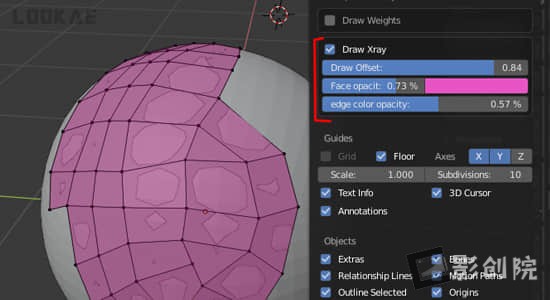
Blender插件-模型顶部网格绘制工具 Draw Xray V4.2.1

Blender插件-模型顶部网格绘制工具 Draw Xray V4.2.1

Draw Xray插件将帮助您在highpoly网格顶部绘制retopo网格,而不会出现内置blender xray的问题(没有适当的背面剔除)。Draw Xray addon will help you to draw retopo mesh on top of your highpoly mesh, without problems of build-in blender xray (no proper back-face culling).

支持软件Blender 2.8 或更高版


【下载地址】

城通网盘 访问密码:6688            百度网盘 提取码: 14q3          阿里云盘


Blender插件-独立渲染管理器 B-Renderon V4.0 Win

Blender插件-独立渲染管理器 B-Renderon V4.0 Win

使用插件可对Blender的工程项目进行批量渲染,不同的项目、摄像机、模式、场景、图层等进行队列渲染输出。


I work every day at a small animation studio, using Blender (among other software), and then I come home and use Blender some more for personal projects. Both at my job and at home, I found that I, and the other animators I work with, were relying more and more on command line scripts to render, both because of performance improvement (i.e. less memory consumption, less rendering-crashes with some add-ons, and generally faster renders) and because we often times need to leave multiple blend files to render overnight or over the weekend.

支持Blender软件版本 4.3, 4.2, 4.1, 4.0, 3.6, 3.5, 3.4, 3.3, 3.2, 3.1, 3.0, 2.9, 2.8, 2.7, 2.6


【下载地址】

城通网盘 访问密码:6688            百度网盘 提取码: w6xa            阿里云盘


Blender插件-物理动力学破碎特效 RBDLab v1.6.1

Blender插件-物理动力学破碎特效 RBDLab v1.6.1

RBDLab是一款新的插件,可以充分利用Blender的物理特性。从破碎物体到使它们爆炸、添加烟雾、碎片或高级使用约束,RBDLab将允许您在Blender中完成迄今为止几乎不可能或您必须花费大量时间的事情。 RBDLab有不同的选项面板和“线性”工作流程,从断裂、刚体、约束、模拟、粒子……您将经历一个好的 RBD 系统所需的所有阶段。它具有高级功能,例如仅从破碎的块或“Acetone”中发射粒子,因此您可以根据需要停用约束。


RBDLab is a new addon to take full advantage of Blender physics. From fracturing objects to making them explode, adding smoke, debris or advanced use of constraints, RBDLab will allow you to do things in Blender that until now were practically impossible or in which you had to spend a huge amount of hours.


支持软件版本 Blender 4.3,4.2, 4.1, 4.0, 3.6, 3.5, 3.4


【下载地址】

城通网盘 访问密码:6688            百度网盘 提取码: 821u            阿里云盘


Blender插件-三维模型展UV工具 Zen Uv V4.5.4.0

Blender插件-三维模型展UV工具 Zen Uv V4.5.4.0

Zen UV不仅仅是一组工具,它还准备好使用管道在 Blender 中快速创建 UV。它代表了由专业人员创建并在实际项目中改进的直观系统。与我们一起享受这次体验吧!


Zen UV is not just a set of tools, it is ready to use pipeline for fast creating UV’s in Blender. It represents an intuitive system created by professionals and refined in real projects. Enjoy this experience with us!


支持软件版本 Blender 2.93, 3.0, 3.1, 3.2, 3.3, 3.4, 3.5, 3.6, 4.0, 4.1, 4.2, 4.3


【下载地址】

城通网盘 访问密码:6688         百度网盘 提取码: 2jbz           阿里云盘


Blender插件-快速创建悬挂电缆线 Cablerator V1.4.10

Blender插件-快速创建悬挂电缆线 Cablerator V1.4.10

Cablerator是一个用于创建和编辑悬挂电缆的Blender插件:

  • 通过单击几何创建电缆
  • 在曲线点之间创建电缆
  • 在几何体或平面上绘制电缆
  • 从边缘创建电缆
  • 从物体创建悬挂电缆
  • 在选定面之间创建大量电缆
  • 使用 Blender 物理模拟电缆
  • 在选定的电缆之间创建绝缘
  • 编辑多个电缆宽度,快速分配配置文件
  • 添加几何体作为电缆的线段和端点
  • 基于网格创建电缆
  • 具有多曲线轮廓的分离电缆以分离电缆
  • 添加和删​​除电缆点的挂钩


支持Blender软件 4.3, 4.2, 4.1, 4.0, 3.6, 3.5, 3.4, 3.3, 3.2, 3.1, 3.0, 2.9, 2.8


【下载地址】

城通网盘 访问密码:6688            百度网盘 提取码: p1yv           阿里云盘


与RizomUV桥接Blender插件 RizomUV Bridge v1.3.0

与RizomUV桥接Blender插件 RizomUV Bridge v1.3.0

为用户提供了一个易于使用的 UI,使得在 Blender 和 RizomUV 之间传输对象和 UV 贴图就像单击按钮一样简单。该插件包括许多用户可配置的设置,因此用户可以设置桥以最适合他们的工作流程。这些设置全部保存在首选项文件中,并将在 Blender 会话之间被记住。


The RizomUV Bridge provides the user with an easy to use UI which makes transferring objects and UV maps between Blender and RizomUV as simple as clicking a button.The addon includes many user-configurable settings so the user can set up the bridge to best suit their workflow. These settings are all saved in the preferences file and will be remembered between Blender sessions.


支持软件版本:

  • Blender 4.3,4.2, 4.1, 4.0, 3.6, 3.5, 3.4, 3.3, 3.2, 3.1, 3.0, 2.93, 2.92, 2.91, 2.9, 2.83, 2.82, 2.81, 2.8
  • Rizom 2019.0.3 或更高版本


【下载地址】

城通网盘 访问密码:6688            百度网盘 提取码: 4ngp           阿里云盘


Blender插件-自定义手绘样条线几何切割破碎工具 Noisy-Cutter v1.8 + 使用教程

Blender插件-自定义手绘样条线几何切割破碎工具 Noisy-Cutter v1.8 + 使用教程

该工具用于从手绘样条曲线中切割、切片几何形状。切割不像其他工具那样平坦,而是凹凸不平,并且带有未包裹的 UV 噪音。您想要在木材、石头、混凝土上创建自然切割……这就是您需要的工具。


Noisy-Cutter has been developed for our productions needs. This tool is done for cutting, slicing geometry from hand draw spline. The cut is not flat like others tools work, but bumpy, noisy with an unwrapped UV. You want to create natural cuts on wood or stone, concrete… this is the tool you need.


支持软件版本 Blender 4.2, 4.1, 4.0, 3.6, 3.5, 3.4, 3.3, 3.2, 3.1, 3.0, 2.93, 2.92, 2.91


【下载地址】

城通网盘 访问密码:6688         百度网盘 提取码: ew3t           阿里云盘